Authentication
This guide explains how to authenticate with the Cadasto API using the OAuth 2.0 Client Credentials flow. This is the standard approach for server-to-server (machine-to-machine) integrations where no interactive user login is needed.
After completing this guide you will be able to obtain an access token and make authenticated API requests.
Prerequisites
- A registered OAuth client (
client_idandclient_secret) issued by Cadasto. If you don't have credentials yet, see Requesting Client Credentials. - Your Cadasto environment base URLs:
- Auth server:
https://<mycompany>.auth.prod.cadasto.io - API server:
https://<mycompany>.api.prod.cadasto.io
- Auth server:
Service discovery
Instead of hardcoding endpoint URLs, you can discover them automatically from the SMART configuration endpoint:
curl "https://<mycompany>.auth.prod.cadasto.io/.well-known/smart-configuration" \
  -H "Accept: application/json"
This returns a JSON document advertising the available endpoints and capabilities:
{
  "authorization_endpoint": "https://<mycompany>.auth.prod.cadasto.io/oauth/authorize",
  "token_endpoint": "https://<mycompany>.auth.prod.cadasto.io/oauth/token",
  "grant_types_supported": ["client_credentials"],
  "scopes_supported": ["api.read", "api.write"]
}
The actual response may include additional fields such as API service URLs (e.g., org.openehr.rest), supported client authentication methods, and SMART capabilities. For the Client Credentials flow described below, you only need the token_endpoint.
Using the discovery endpoint makes your integration more resilient to future URL changes.
How the Client Credentials flow works
The Client Credentials flow lets a backend service authenticate directly with the authorization server, without a user being present. Your application sends its client_id and client_secret to the token endpoint and receives a time-limited access token in return.
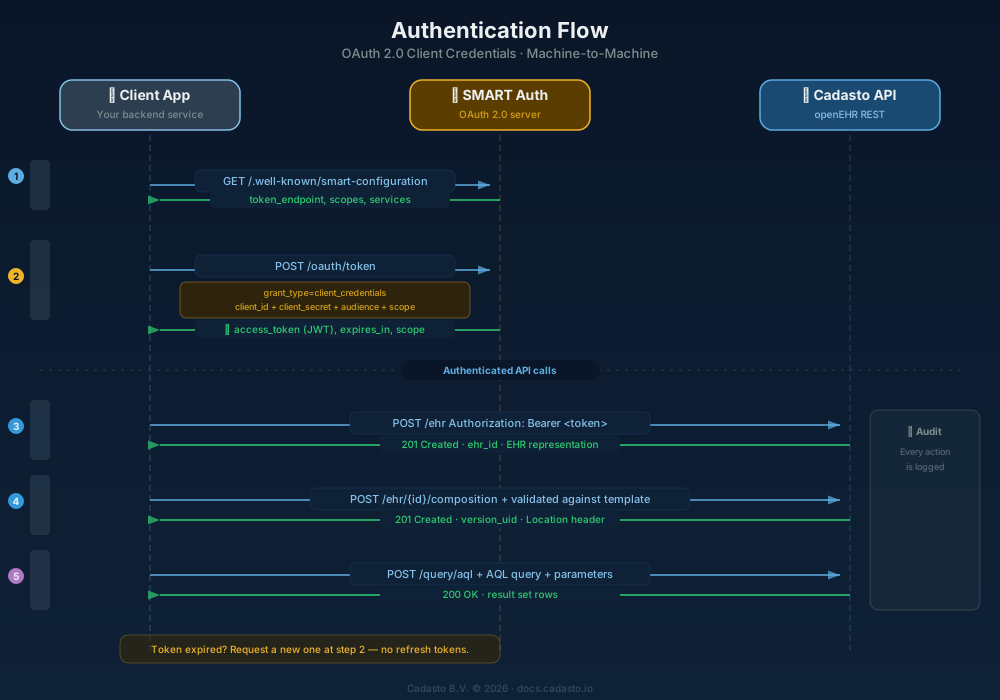
For more detail on the underlying standard, see RFC 6749 Section 4.4.
Obtain an access token
Send a POST request to the token endpoint with your client credentials. The recommended approach is HTTP Basic authentication (credentials in the Authorization header).
Token endpoint
POST https://<mycompany>.auth.prod.cadasto.io/oauth/token
Parameters
| Parameter | Location | Required | Description |
|---|---|---|---|
grant_type |
Body | Yes | Must be client_credentials |
client_id |
Header (Basic Auth) | Yes | Your OAuth client ID |
client_secret |
Header (Basic Auth) | Yes | Your OAuth client secret |
audience |
Body | Yes | The API you want to access, e.g. https://<mycompany>.api.prod.cadasto.io/openehr/v1 |
scope |
Body | No | Space-separated list of scopes, e.g. api.read api.write |
Example request
curl -X POST "https://<mycompany>.auth.prod.cadasto.io/oauth/token" \
  -H "Content-Type: application/x-www-form-urlencoded" \
  -u "<client_id>:<client_secret>" \
  -d "grant_type=client_credentials" \
  -d "audience=https://<mycompany>.api.prod.cadasto.io/openehr/v1" \
  -d "scope=api.read+api.write"
If you cannot use HTTP Basic authentication, you may include client_id and client_secret as form body parameters instead (less preferred).
Successful response
{
  "access_token": "eyJhbGciOiJSUzI1NiIs...",
  "token_type": "Bearer",
  "expires_in": 3600,
  "scope": "api.read api.write"
}
| Field | Description |
|---|---|
access_token |
The Bearer token to include in API requests |
token_type |
Always Bearer |
expires_in |
Token lifetime in seconds (typically 3600 = 1 hour) |
scope |
The scopes granted by the server |
Use the access token
Include the token in the Authorization header of every API request:
curl "https://<mycompany>.api.prod.cadasto.io/openehr/v1/definition/template/adl1.4" \
  -H "Authorization: Bearer <access_token>" \
  -H "Accept: application/json"
Example response (list of uploaded templates):
[
  {
    "template_id": "vital_signs.v1",
    "concept": "Vital Signs",
    "archetype_id": "openEHR-EHR-COMPOSITION.encounter.v1"
  }
]
Handle token expiry
The Client Credentials flow does not return a refresh_token. When your access token expires, request a new one by repeating the token request above.
Recommended approach: Check the expires_in value from the token response and schedule a new token request before the current token expires. This avoids failed API calls due to expired tokens.
Token received at 14:00:00 with expires_in=3600
  → Token expires at 15:00:00
  → Request new token at ~14:55:00 (with a safety margin)
Error responses
If the token request fails, the auth server returns an error in the standard OAuth 2.0 error format:
{
  "error": "invalid_client",
  "error_description": "Client authentication failed."
}
Common errors:
| Error | Cause |
|---|---|
invalid_client |
Wrong client_id or client_secret |
invalid_grant |
Incorrect grant_type |
invalid_request |
Invalid client credentials or refresh token |
invalid_scope |
Requested scope not allowed for this client |
Next steps
- Quick Start — Create your first EHR, upload a template, and commit a composition
- AQL Guide — Query your openEHR data
- openEHR Concepts — Understand the data model behind the APIs