openEHR Concepts
openEHR is an open specification for vendor-neutral, interoperable electronic health records. This page covers the key concepts you need to understand when working with the Cadasto API.
After reading this page, you should be able to:
- Explain the two-level modelling split (Reference Model vs clinical models) and why it matters for integrations
- Navigate EHR, template, composition, and contribution in the Cadasto APIs
- Choose the right mental model before you open the Quick Start or AQL Guide
For normative detail, see the openEHR specifications; the sections below focus on what matters for day-to-day API use.
The two-level modelling approach
openEHR separates technical infrastructure from clinical content:
- Reference Model (RM) — A stable set of data types and structures that define how data is stored and exchanged. The RM rarely changes. See the RM specification.
- Clinical models (archetypes and templates) — Define what clinical data looks like. These can evolve independently of the software, allowing clinicians and informaticians to update clinical definitions without changing code.
This separation means you can build your integration against the RM once and support new clinical content by uploading new templates — often without changing your integration code (only configuration and validation rules change).
Key concepts
EHR
An EHR (Electronic Health Record) is the root container for a single patient or subject. Each EHR has a unique ehr_id (UUID, stable for the lifetime of the record) and contains:
| Part | Description |
|---|---|
| EHR_STATUS | Subject link, queryable/modifiable flags. Controls whether this EHR participates in population queries. |
| Compositions | Clinical and administrative documents (versioned). The main content of the EHR. |
| Directory | Optional folder hierarchy for organizing compositions (e.g., by episode or problem). |
| Contributions | Change-set records grouping versions committed together in one operation. |
By design, the EHR contains no identifying demographic information about the patient. The subject is referenced via EHR_STATUS.subject (a PARTY_SELF), which optionally points to a separate demographic service. This separation supports privacy — accessing an EHR does not automatically reveal patient identity.
In Cadasto, you create an EHR per subject using POST /ehr and reference it by ehr_id in all subsequent operations.
Archetypes
An archetype is a reusable clinical content model. For example, there are archetypes for blood pressure measurement, medication orders, and laboratory results. Archetypes are developed collaboratively and published in the Clinical Knowledge Manager (CKM).
As an integrator, you typically use existing archetypes rather than creating new ones.
Templates
A template combines and constrains one or more archetypes for a specific use case — for example, a "Vital Signs" template that includes blood pressure, heart rate, and body temperature archetypes with specific constraints. Templates are distributed as Operational Templates (OPT) — compiled, self-contained XML files ready for use by a CDR.
In Cadasto, you upload ADL 1.4 OPT templates via the Definition API (POST /definition/template/adl1.4). Templates drive validation: every composition committed to the EHR is validated against its template.
Compositions
A Composition is a clinical document committed to an EHR. Every composition is validated against the template it was created with (the template identifier is carried in the composition metadata). Compositions are versioned: each update creates a new version while preserving the full history.
Every composition has a category that determines its lifecycle:
| Category | Meaning |
|---|---|
| event | Records a healthcare event (encounter, test, procedure). Most common type; accumulates over time. |
| persistent | Ongoing patient state (problem list, medication list, allergies). Maintained as a single updated instance. |
| episodic | Relevant for a bounded period of care (e.g., a hospital admission). Similar to persistent but scoped to an episode; transitions to inactive when the episode ends. Cadasto's Extra API provides dedicated endpoints for creating, activating, and managing episodes of care within an EHR. |
Compositions also carry mandatory metadata: composer (who is responsible for the content), language, territory, and optional context (the healthcare event time, setting, and participants).
In Cadasto, commit compositions via POST /ehr/{ehr_id}/composition.
Entry types
Within a composition, all clinical content is expressed as Entry instances. openEHR defines distinct entry types based on the nature of the information, which makes querying unambiguous:
| Entry type | What it records | Examples |
|---|---|---|
| OBSERVATION | Measured or observed phenomena (time-structured) | Blood pressure, lab result, patient-reported symptom |
| EVALUATION | Clinical opinions and assessments | Diagnosis, risk assessment, care plan |
| INSTRUCTION | Orders for future actions | Medication order, referral, investigation request |
| ACTION | What was actually performed | Drug administered, procedure completed |
| ADMIN_ENTRY | Administrative logistics | Admission, discharge, appointment |
Using the correct entry type matters for querying: "all active medications" can be found by querying INSTRUCTIONs by state, while "all administered medications" comes from ACTIONs.
AQL (Archetype Query Language)
AQL is a SQL-like query language designed for openEHR data. It queries using archetype paths rather than database columns, making it possible to retrieve specific clinical data points (e.g., all blood pressure readings above 140 mmHg) regardless of which template was used to capture them.
AQL sits between clinical models and physical storage: archetypes define the expected structure, AQL references those paths to retrieve data, and the query engine translates this into storage-level operations.
See the AQL Guide for syntax and examples.
Versioning and change control
All mutable content in the EHR (compositions, directories, EHR status) is change-controlled:
- Every change creates a new VERSION in a VERSIONED_OBJECT container.
- Each version has a unique identifier:
{object_id}::{creating_system_id}::{version_tree_id}(e.g.,8849182c-82ad-4088-a07f-48ead4180515::cadasto.io::1). - Deletions are logical — the data is marked as deleted but remains in the version history.
- Every commit records an audit trail: who committed, when, and what type of change.
This means previous states of the record can always be reconstructed — a key requirement for medico-legal traceability.
Contributions
A Contribution groups one or more version commits into a single atomic change-set representing one user action (e.g., a GP encounter that creates an event composition and updates the medication list). All members are committed atomically with shared audit metadata.
When using the Cadasto REST API, you can either commit individual compositions (the API creates the contribution automatically) or explicitly create a contribution with multiple versioned objects via POST /ehr/{ehr_id}/contribution.
Demographics
openEHR includes a separate Demographic Information Model for managing the identities and relationships of parties involved in healthcare. The model is built around a PARTY hierarchy:
| Type | Description |
|---|---|
| PERSON | An individual (patient, clinician, administrator) |
| ORGANISATION | A healthcare facility, insurer, or other entity |
| ROLE | A function performed by an actor (e.g., "GP", "nurse", "patient") — roles have their own identity and time validity |
| PARTY_RELATIONSHIP | A directed relationship between parties (e.g., "patient of", "employed by") |
Demographic data is versioned and separated from clinical content by design. The EHR references the subject via PARTY_SELF but does not embed demographic details — this supports privacy and allows the demographic service to be managed independently.
In Cadasto, manage demographic entities via the Demographic API. Demographic data follows the same versioning and contribution model as EHR data.
When an EHR is created for a PERSON that already exists in the Demographic API, Cadasto offers a vendor-extension cadasto-person-uid request header that links the two in a single call — see the Cadasto demographic link guide.
Cadasto’s AQL engine includes an experimental extension for querying demographic data alongside clinical content (for example, filtering by attributes that live in the demographic service). Behaviour and syntax may change; confirm with Cadasto before relying on it in production. See the AQL Guide for examples and limitations.
Content formats
The Cadasto API supports the standard openEHR canonical representation formats for compositions:
| Format | Content-Type | Use case |
|---|---|---|
| Canonical JSON | application/json |
Full RM fidelity, standard openEHR format |
| Canonical XML | application/xml |
Full RM fidelity, XML variant |
How these concepts connect
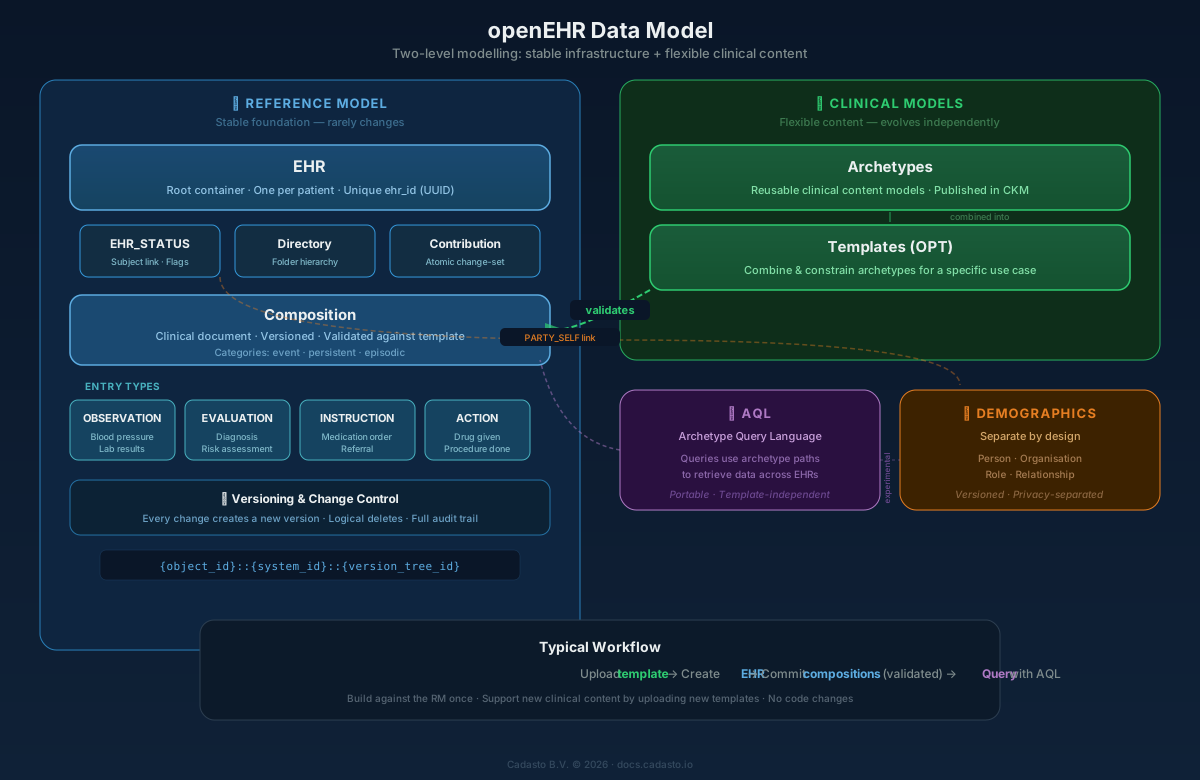
A typical workflow:
- Upload a template that defines the clinical form structure
- Create an EHR for a patient
- Commit compositions (clinical documents) to the EHR — Cadasto validates each against its template
- Query data across patients using AQL
Next steps
- Quick Start — Walk through this workflow with real API calls
- AQL Guide — Learn to query clinical data
- Authentication — Set up API access
- Data Validation — Validate templates and models before upload
- EHR API Reference — Full API specification for EHR operations
- Definition API Reference — Template upload and management
- Demographic API Reference — Party and relationship management