Quick Start
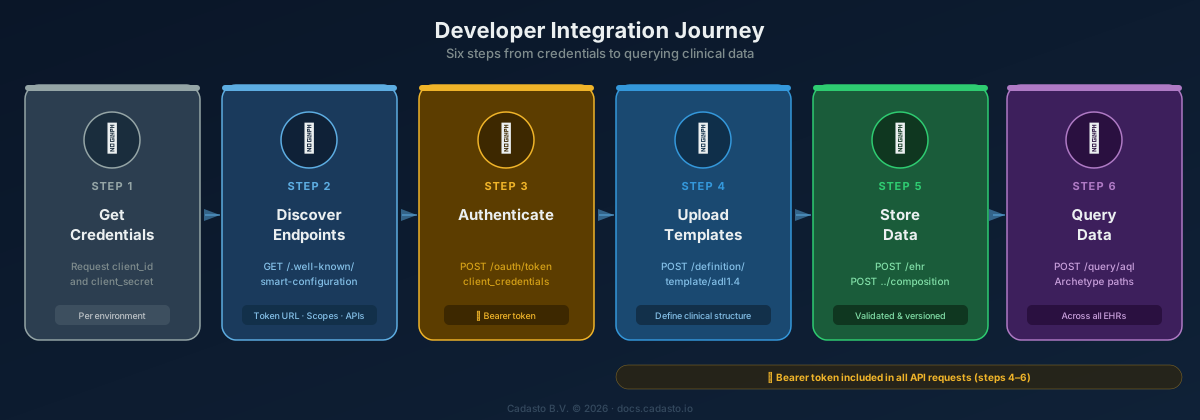
This guide walks you through the typical Cadasto workflow: authenticate, create an EHR, upload a template, commit a composition, and query data. All examples use curl — replace <mycompany> and <token> with your actual values.
Prerequisites
- A Cadasto environment with credentials (
client_idandclient_secret). See Requesting Credentials if you don't have them yet. - An access token obtained via the Authentication guide.
All API requests require a Bearer token in the Authorization header. See Authentication for how to obtain one.
Base URL for all API calls:
https://<mycompany>.api.prod.cadasto.io/openehr/v1
1. Create an EHR
Create a new Electronic Health Record. The server generates a unique ehr_id.
POST /ehr
Prefer: return=representation
Authorization: Bearer <token>
Response (201 Created):
{
  "system_id": { "value": "cadasto.io" },
  "ehr_id": { "value": "7d44b88c-4199-4bad-97dc-d78268e01398" },
  "ehr_status": { ... },
  "time_created": { "value": "2025-01-15T10:30:00.000+00:00" }
}
Retrieve an existing EHR:
GET /ehr/{ehr_id}
Accept: application/json
Authorization: Bearer <token>
Understanding the response
ehr_idis a UUID that uniquely identifies this EHR. Use it in all subsequent API calls.ehr_statuscontains subject information and queryable/modifiable flags.- You can optionally provide an
EHR_STATUSbody withPOST /ehrto set subject references or other details at creation time.
Already have a Cadasto PERSON for this patient? Add the cadasto-person-uid: <uid> request header on POST /ehr and the EHR is linked to that PERSON in the same call. See the Cadasto demographic link guide.
2. Upload a template
Templates define the structure and constraints for clinical documents. You must upload at least one template before committing compositions. Upload an ADL 1.4 Operational Template (OPT) in XML format.
POST /definition/template/adl1.4
Content-Type: application/xml
Prefer: return=minimal
Authorization: Bearer <token>
<template xmlns="http://schemas.openehr.org/v1">
    <language>
        <terminology_id><value>ISO_639-1</value></terminology_id>
        <code_string>en</code_string>
    </language>
    ...
</template>
List all uploaded templates:
GET /definition/template/adl1.4
Authorization: Bearer <token>
Retrieve a specific template:
GET /definition/template/adl1.4/{template_id}
Authorization: Bearer <token>
3. Commit a composition
A Composition is a clinical document committed to an EHR. It is validated against the template specified by its archetype_node_id.
Not sure what a valid composition looks like for your template? Use the example endpoint to generate one:
GET /definition/template/adl1.4/{template_id}/example
This returns a fully populated example composition based on your template, which you can use as a starting point.
POST /ehr/{ehr_id}/composition
Content-Type: application/json
Prefer: return=representation
Authorization: Bearer <token>
{
  "archetype_node_id": "openEHR-EHR-COMPOSITION.encounter.v1",
  "name": { "value": "Vital Signs" },
  "uid": {
    "_type": "OBJECT_VERSION_ID",
    "value": "8849182c-82ad-4088-a07f-48ead4180515::openEHRSys.example.com::1"
  },
  "language": { ... },
  "territory": { ... },
  "category": { ... },
  "composer": { ... },
  "content": [ ... ]
}
Response (201 Created): The committed composition with a Location header pointing to its versioned URI.
4. Retrieve or update a composition
Compositions are versioned. There are two ways to address them:
- Versioned object UID (e.g.,
8849182c-82ad-4088-a07f-48ead4180515) — always resolves to the latest version. - Version UID (e.g.,
8849182c-82ad-4088-a07f-48ead4180515::cadasto.io::1) — resolves to a specific version. The format is{object_id}::{system_id}::{version_tree_id}.
Latest version:
GET /ehr/{ehr_id}/composition/{versioned_object_uid}
Authorization: Bearer <token>
Specific version:
GET /ehr/{ehr_id}/composition/{version_uid}
Authorization: Bearer <token>
Update (optimistic locking with If-Match):
PUT /ehr/{ehr_id}/composition/{versioned_object_uid}
If-Match: "<latest_version_uid>"
Content-Type: application/json
Authorization: Bearer <token>
The If-Match header prevents lost updates: if another client has modified the composition since you last read it, the server returns 412 Precondition Failed. Retrieve the latest version and retry.
Delete (logical):
DELETE /ehr/{ehr_id}/composition/{version_uid}
Authorization: Bearer <token>
Deletions are logical — the data is marked as deleted but remains in the version history for audit purposes.
5. Organize with directories
Use Directories (Folders) to organize compositions within an EHR.
Note: The directory is automatically created when the EHR is created — there is no need to call
POST /ehr/{ehr_id}/directory.
Update (with concurrency control):
PUT /ehr/{ehr_id}/directory
If-Match: "<latest_version_uid>"
Authorization: Bearer <token>
Fetch a path at a specific time:
GET /ehr/{ehr_id}/directory?path=episodes/a/b&version_at_time=2025-01-15T10:30:00.000+00:00
Authorization: Bearer <token>
6. Batch commit with contributions
A Contribution groups multiple versioned object changes into a single atomic commit.
POST /ehr/{ehr_id}/contribution
Content-Type: application/json
Authorization: Bearer <token>
The request body contains a versions array with the operations and audit metadata.
7. Query data with AQL
Use AQL (Archetype Query Language) to query clinical data across EHRs using archetype paths. AQL queries are portable — they work regardless of which template was used to capture the data. The recommended approach is POST with the query in the request body:
POST /query/aql
Content-Type: application/json
Authorization: Bearer <token>
{
  "q": "SELECT e/ehr_id/value, c/uid/value FROM EHR e CONTAINS COMPOSITION c WHERE e/ehr_id/value = $ehr_id",
  "query_parameters": {
    "ehr_id": "7d44b88c-4199-4bad-97dc-d78268e01398"
  }
}
See the AQL Guide for query syntax, clauses, and clinical examples.
Quick reference
| Action | Endpoint | Method | Notes |
|---|---|---|---|
| Create EHR | /ehr |
POST | Optional EHR_STATUS body |
| Get EHR | /ehr/{ehr_id} |
GET | 404 if not found |
| Create composition | /ehr/{ehr_id}/composition |
POST | 201 + Location header |
| Get composition (latest) | /ehr/{ehr_id}/composition/{versioned_object_uid} |
GET | Uses container ID |
| Get composition (version) | /ehr/{ehr_id}/composition/{version_uid} |
GET | Specific version |
| Update composition | /ehr/{ehr_id}/composition/{versioned_object_uid} |
PUT | If-Match required |
| Delete composition | /ehr/{ehr_id}/composition/{version_uid} |
DELETE | Logical delete |
| Upload template (ADL 1.4) | /definition/template/adl1.4 |
POST | XML body |
| List templates | /definition/template/adl1.4 |
GET | Returns metadata list |
| Get template | /definition/template/adl1.4/{id} |
GET | Returns template |
| Store query | /definition/query/{name} |
PUT | text/plain AQL body |
| Execute ad-hoc AQL | /query/aql |
POST | JSON body |
| Execute stored query | /query/{qualified_query_name} |
GET | Query params for variables |
| Create person | /demographic/person |
POST | Demographic entity |
| Get person | /demographic/person/{person_id} |
GET | Returns versioned party |
| Create organisation | /demographic/organisation |
POST | Demographic entity |
| Create party relationship | /demographic/party_relationship |
POST | Directed relationship |
Cadasto also provides a Demographic API for managing persons, organisations, roles, and party relationships. Demographic data is versioned and separated from clinical content by design. See the openEHR Concepts guide for how demographics relate to EHRs.
Beyond the standard openEHR REST APIs above, Cadasto offers an Extra API with convenience endpoints for datamaps, episodes of care, terminology helpers, and user information. These simplify common integration tasks but are Cadasto-specific — they are not part of the openEHR specification and may change between platform releases.
Next steps
- Authentication — Token lifecycle and service discovery
- AQL Guide — Full query syntax and clinical examples
- openEHR Concepts — Understand the data model
- Data Validation — Validate templates and models before uploading
- EHR API Reference — Full OpenAPI specification
- Extra API Reference — Cadasto-specific convenience endpoints